Most frequently asked questions and answers
Our products
If you experience a problem where the activation window appears every time you launch Microsoft Office, try the following troubleshooting steps to change, remove or activate a possibly blocked or invalid product key.
If Microsoft Office activation no longer works via the normal activation mask, test if another code has already been entered in the background.
Step 1: Start the console (CMD) as administrator
You can do this by opening CMD as administrator. Click the Start button on the Windows menu; in older versions of Windows, this is called “Start.” Type CMD and right-click to select “Run as administrator.”.
Step 2: Go to the program folder
cd “C:³”
Note: The folder name “Office16” may vary depending on the program version. If you installed Office in the 32-bit version, use the following path:
cd “C:Program Files”
Note: If you cannot find the file cscript.exe in the “Program Files” or “Program Files(x86)” folder, try opening it from “C:Windows32”. However, the path to the file OSPP.VBS must be changed.
Example:
cscript C:Program FilesMicrosoft OfficeOffice16OSPP.VBS /dstatus
Step 3: Display installed keys
You can use the following command to display the current status of installed keys:
cscript OSPP.VBS /dstatus
The output of the command provides information such as:
- How many keys are installed
- For which Office version is the key
- License status
- The last five characters of the installed key (used for selection)
If you find two active keys in this window, delete the inactive key.
Step 4: Removing keys
Remove the inactive key with the following command:
Replace “XXXXX” with the last five characters of the key you are using (printed in the “dstatus” command under “Last five characters of installed product key”).
cscript OSPP.VBS /unpkey:XXXXXX
Step 5: Enter a new key
Enter a new key with the following command:
Replace “XXX...” with the new key.
cscript OSPP.VBS /inpkey:XXXXXX-XXXXXXXX-XXXXXX-XXXXXXXX
Step 6: Activate the new product code
Run the activation command:
cscript OSPP.VBS /act
This procedure works for all current Office versions through version 2021 (Office 2003, 2007, 2010, 2013, 2016, 2019, 2021).
Try another browser first. If that doesn't work, temporarily disable your antivirus program or firewall while downloading. All installation programs/images come directly from Microsoft and are free of viruses, malware, etc. - we guarantee it!
Consider the following steps before upgrading to Windows 11:
- Check Compatibility: Use Microsoft's PC Health Check tool to check if your PC meets the system requirements.
- Back up your data: Protect important files on an external drive or in the cloud.
- Install updates: Update your current operating system and all drivers to the latest version.
- Check software compatibility: Check if your applications are compatible with Windows 11.
- Free up space: Make sure you have enough storage space for the upgrade.
- Create a system restore point: Set a restore point in case problems occur.
These steps ensure a smooth upgrade.
No, Windows 11 cannot be installed on every computer because it has its own system requirements. Some important requirements are:
- Compatible 64-bit processor with at least 1 GHz and at least 2 cores
- Minimum of 4 GB RAM
- Minimum 64 GB of available storage space
- DirectX 12-compatible graphics card with WDDM 2.x
- Display with a resolution of at least 720p, diagonal greater than 9 inches, 8 bits per color channel
- UEFI firmware with Secure Boot
- Trusted Platform Module (TPM) version 2.0
- PCs that do not meet these requirements cannot run Windows 11. Microsoft offers a tool called “PC Health Check” to check if your current PC is compatible with Windows 11.
Most problems are usually minor. Do not hesitate to contact us; our technical support will help you until your purchased product is fully functional. If necessary, the product will be installed/configured remotely.
Windows 10 S mode is a version of Windows 10 optimized for security and performance that provides a familiar Windows experience. For enhanced security, only apps from the Microsoft Store are allowed and Microsoft Edge is required for secure browsing.
Switching to S mode is free. Go to Settings > Update and Security > Activation on a PC with Windows 10 S Mode. Select the option in the ‘Switch to Windows 10 Home’ or ‘Switch to Windows 10 Pro’ section to go to the store.
We guarantee that all our products are original because we are an authorized distributor of Microsoft software. All our products come with a full lifetime product warranty.
Please check your spam folder first. Contact us if you don't find anything there. We will fix the problem as soon as possible. Unfortunately, there may be typos in the email address or the email may not be delivered.
With Electronic Software Delivery (ESD), a customer purchases software online, receives a download link and product key by e-mail, downloads the software, installs it on their device and finally activates it with the product key.
ESD stands for “Electronic Software Delivery” and refers to the process by which software products are delivered digitally over the Internet rather than on physical storage media such as DVDs or USB sticks. Customers receive a download link and, if applicable, a product key by e-mail after purchase, which allows them to download and activate the software immediately. This ensures quick availability and installation without shipping.
Our products are delivered digitally immediately after payment. Once we confirm your payment, you will receive an email with all the necessary information to download, install and activate.
With these payment methods, it may take some time for the payment to be credited by the payment provider and for the store to receive confirmation. This process usually takes up to 24 hours, but is not common. We will ship your product as soon as we receive payment confirmation from the provider.
Visio is an innovative solution for easily visualizing data-driven business processes, enabled by the powerful features of Microsoft 365. In Microsoft Teams, you can easily create, use and collaborate on Visio diagrams.
Do not install any other or older Office applications on your system. If you experience problems installing Office, try the following:
- Run as administrator: Right-click on the installation file and select ‘Run as administrator.
- Disable antivirus: Temporarily disable your antivirus and try the installation again.
- Check your Internet connection: A stable connection is important.
- Uninstall and reinstall Office: Remove existing Office installations and reinstall the package.
- Updating your system: Update your operating system.
- Check storage: Make sure you have enough storage space for the installation.
- Look for error messages: Refer to the Office support page or contact Microsoft Support for specific errors.
Yes, Microsoft Visio and Project are compatible with Office packages, but are not included and must be purchased separately. They complement Office applications such as Word, Excel and PowerPoint and can be installed alongside them on the same computer. Note compatibility with respect to version (year) and 32-bit or 64-bit.
Example 1: Visio 2013 Prof Plus and Office 2016 Prof Plus -> not compatible, so both programs cannot be used simultaneously on one system.
Example 2: Visio 2013 Prof Plus and Office 2013 Prof Plus -> compatible, both programs can be installed and used on one system without problems.
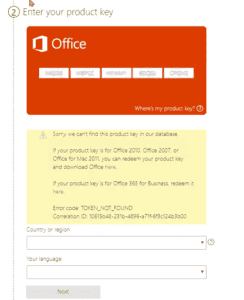
You must install the correct version of the Office product activation assistant. setup.office.com is not compatible with other product codes.
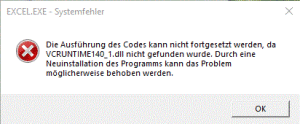
To solve this problem, download Microsoft Visual C++ Redistributable for Visual Studio 2015, 2017 and 2019. The following updates are the latest supported Visual C++ Redistributable packages for Visual Studio 2015, 2017 and 2019. They include a base version of Universal C Runtime. See MSDN for more information.
- x86: vc_redist.x86.exe
- x64: vc_redist.x64.exe
- ARM64: vc_redist.arm64.exe
- Download the appropriate version for your system.
- Run and install the downloaded version.
- Restart your system.
Please install the correct version of Office. You can find the correct software for your purchased product key on our download page. Please note that older or newer versions should be uninstalled before installation to avoid activation errors.
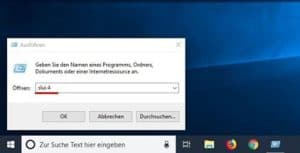
2. A new window will open. Select the appropriate country from the drop-down menu and click “Next.”.
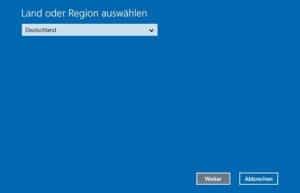
- You will see an installation ID with nine blocks of digits. Above it is a phone number to call.
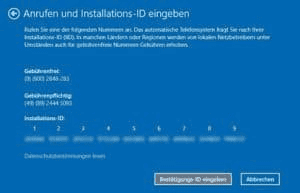
- If you prefer to activate your phone yourself, a computerized voice will guide you in entering the numbers on your phone's keypad. You will then receive a verification code with the blocks A through H. Write this number on a piece of paper.
- Click the ‘Enter Verification Code’ button and enter the code you just received.
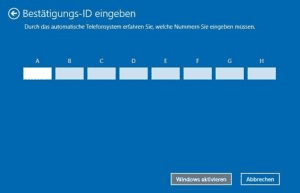
- Click the Activate Windows button to complete the activation process.
- Done. We hope you enjoy your product.
Winget is a Windows package manager that allows users to install, update and manage software from the command line. The program was developed by Microsoft and is part of the Windows package manager. Winget allows users to view a list of available packages, install specific software packages, update already installed software and perform various other functions via simple command prompts. Its functionality is similar to that of other package managers, such as APT for Debian systems or YUM for Red Hat systems, but is specifically optimized for Windows.
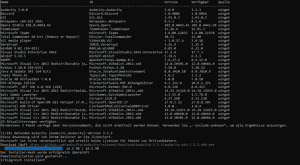
To upgrade all programs on your Windows 10 or Windows 11 operating system, type the following command:
Winget upgrade -all
For more information and additional assignments, visit: https://learn.microsoft.com/en-us/windows/package-manager/winget/
If you would like to place a bulk order, please email us with the product and quantity you require. We will respond as soon as possible and confirm your order depending on product availability.
Office Home & Business 2021 or Office Home & Student 2021 are also available for Mac as a one-time purchase. The Office applications Word, Excel, PowerPoint, Outlook and OneNote are available for Mac. The Publisher and Access applications are not available for Mac.
Office Home & Business 2024 or Office Home & Student 2024 are also available for Mac as a one-time purchase. The Office applications Word, Excel, PowerPoint, Outlook and OneNote are available for Mac. The Publisher and Access applications are not available for Mac.
Our customer service team is available 24/7 and is happy to help you quickly with all your questions. Send us an email or use our live chat to contact us.
In some cases, we also offer free remote support. This means that we remotely connect to your computer so that we can fix the problem as if we were there ourselves. You can rest assured that you can follow our every step. To make this possible, we use the free AnyDesk software.
We offer our products in English, Spanish, Italian, German and French. If your preferred language is not available, you can download the Office Language Add-in Pack to use the display and proofreading tools in your preferred language.
Office Language Accessory Pack https://support.microsoft.com/nl-nl/office/language-accessory-pack-for-microsoft-365-82ee1236-0f9a-45ee-9c72-05b026ee809f
The Language Accessory Pack includes display and proofreading tools for most languages, but you can still choose to display in one language and edit or create in another.
Microsoft Teams is a messaging app for teams that provides a central space for conversations, meetings, files and notes. It makes collaboration and working in an open environment easier.
Office 2021 Professional Plus includes Word, Excel, PowerPoint, Outlook, OneNote, Publisher, Access and Teams.
Office 2024 Professional Plus includes Word, Excel, PowerPoint, Outlook, OneNote, Publisher, Access and Teams.
Yes. If you are interested in other Microsoft products that are not in the Store, you can also contact us. Almost all Microsoft products are available.
CAL stands for “Client Access License.” It is a license that gives users or devices the right to use services or features on a server. CALs are especially important with Microsoft server products such as Windows Server, SQL Server, Exchange Server and many others.
There are two main types of CALs:
- User CALs: This type of license gives a specific user the right to use the server from any device (such as a workstation, home computer, smartphone, etc.).
- Device CALs: This type of license gives a specific device the right to use each user's server. This option can be more cost-effective when multiple users use the same workstation or device to access the server.
The choice between user and device CALs depends on the usage scenario of your business or organization. Microsoft offers these flexible licensing options for different business models and work styles.
CALs are necessary because Microsoft server operating systems and some other server products are licensed on a per-use basis. This means that in addition to the server license itself, additional licenses are required to legally use the server.
Activation verifies the authenticity of your software copy and guarantees that it is used in accordance with the license terms. This is usually done by entering a product or license key that gives full access to all features and updates of the software.
Office 2021 requires an Internet connection to install, activate and download updates. After installation and activation, core applications such as Word, Excel and PowerPoint can be used offline. However, certain features and services, such as Office updates and cloud services (such as OneDrive), still require an Internet connection.
Office 2024 requires an Internet connection to install, activate and download updates. After installation and activation, core applications such as Word, Excel, and PowerPoint can be used offline. However, certain features and services, such as Office updates and cloud services (such as OneDrive), still require an Internet connection.
A license for one computer allows you to use the software on one computer, while a license for two computers allows you to use the software on two devices. The main difference is the number of computers on which you can install and activate the software.
1 computer = 1 operating system/device
2 computers = 2 operating systems/devices
We strive to provide our customers with the best possible service and support. Negative or unfriendly messages do not solve problems. You can contact us by email if you are not satisfied. We are understanding and helpful. Your satisfaction is important to us!
Windows 10 offers full flexibility to install apps from any source, while Windows 10 S lets you install only apps from the Microsoft Store for improved security and performance.
If online activation fails, try the following:
- Check your Internet connection.
- Temporarily disable your firewall and antivirus.
- Run as administrator.
- Set the system time correctly.
- Use the Microsoft Support and Recovery Assistant.
- Try activating by phone.
- Contact Microsoft Support.
You can easily check this by opening Windows 10 settings and going to ‘Update and Security’ > ‘Activation. Here, Windows 10 displays the installed version and activation status.
Compared to older versions, Windows 11 has a new and very intuitive user interface. Moreover, this operating system offers numerous features that significantly improve your workflow. Moreover, security has been improved thanks to modern features. Windows 11 is designed to enable users to work more efficiently and with less stress. Therefore, the switch may be worthwhile for anyone currently using Windows 10 or one of the many older versions.
Microsoft Office 2021 Professional Plus is available as Microsoft's comprehensive productivity suite. The suite includes a wide range of applications, including Word, Excel, PowerPoint, OneNote, Outlook, Teams, Publisher and Access - everything you need to succeed in a professional environment.
Retail versions of Office 2021 are supported until Oct. 09, 2029, with no extended support period, unlike older versions of Office.
[accordion_item title="How long will Microsoft Office 2024 be supported?"]
Retail versions of Office 2024 are supported until Oct. 09, 2029, with no extended support period, unlike older versions of Office.
As of April 2023, macOS versions include:
- OS X 10.0 Cheetah to OS X 10.11 El Capitan
- macOS 10.12 Sierra to macOS 10.15 Catalina
- macOS 11 Big Sur
- macOS 12 Monterey
- macOS 13 Ventura
Currently, we only offer Office 2021 Home and Business versions that work on Mac. Consumers can generally purchase Microsoft Office 2021 for Windows and Mac, and business customers can now purchase Microsoft Office LTSC for Windows and Mac. Office 2021 and Office LTSC 2021 are the next stable releases of Office. They include enhancements over Microsoft Office 2019 and previous on-premises Office versions.
Currently, we only offer the Office 2024 Home and Business edition that runs on Mac. In general, consumers can purchase Microsoft Office 2024 for Windows and Mac, and business customers can now purchase Microsoft Office LTSC for Windows and Mac. Office 2024 and Office LTSC 2024 are the next stable releases of Office. They include enhancements over Microsoft Office 2019 and previous on-premises Office versions.
Office LTSC is the latest stable release of Office for businesses and government agencies. It is license-based and available as a one-time, “perpetual” purchase for both platforms (Windows and Mac). Like the previous version of Office 2021, Office LTSC includes Word, Excel, PowerPoint, Outlook, OneNote, Access (Windows only) and Publisher (Windows only).
You will receive lifetime support for the products you purchase through our website. Please contact our customer service team via email and we will make sure all issues are resolved.
If you receive an error message stating that the product code has already been used, there could be several reasons. Please contact our customer service via email or follow the instructions in our activation guide.
Officially, Microsoft Edge cannot be uninstalled because it is deeply integrated into Windows. It is advisable to set another browser as your default browser if you do not want to use Edge, as advanced deletions may affect your system.
Although MS Planner is better suited for small and medium-sized projects, MS Project really excels at large projects, extensive ERP resource planning or linking multiple independent projects.
Because we purchase large quantities from large companies and through multiple European purchasing channels, we can keep the price very low in most cases. Moreover, we deliver all our products digitally, eliminating the shipping costs normally associated with physical products.
Yes, the traditional Office 2021 package includes local versions of Word, Excel, PowerPoint and Outlook. Starting with the Professional Edition, Access and Publisher are also included.
Yes, the traditional Office 2024 package includes local versions of Word, Excel, PowerPoint and Outlook. Starting with the Professional Edition, Access and Publisher are also included in the package.
The difference between Professional Plus and Microsoft Office Standard is in the applications included. Office Standard offers the same basic package as Office Professional, but Access and Publisher are missing from Office Standard.
We offer only legal activation codes and all our activation codes comply with European legislation and originate from the EU. You will receive an invoice including VAT and a certificate of origin. Only the product code and installation guide needed to activate the software will be sent by email. No CDs or other media or Certificates of Authenticity (COA) are provided. The products offered have been checked according to trade regulations.
Check the system requirements listed on our download page. The first step in testing and ensuring software compatibility is to check the system requirements for the software you are installing or updating. System requirements are the minimum hardware and software requirements for proper operation of your device.
Activation codes are emailed immediately after payment. Sometimes this may take longer than indicated. There may be several reasons for this, but don't panic, they are on their way! Please contact us if anything goes wrong! TIP: Check your spam folder too!
Most options have a trial period of 30 or 60 days after download. Do you want to use Office after the trial period? You need to activate Office with a license key.
Follow these steps to install a new operating system on a computer that does not already have an operating system:
- Select an operating system (e.g., Windows or Linux).
- Download the operating system as an ISO file and burn it to a USB drive to create a bootable USB drive. For Windows, use the “Windows Media Creation Tool.”.
- Restart your computer and press a key (often F2, F10 or DEL) to open the BIOS or UEFI. Change the setting to boot from USB.
- Follow the on-screen installation instructions. Choose where you want to install the operating system and enter the required information.
- Complete the installation and restart your computer. Remove the USB drive so that your computer boots with the new operating system.
Your new operating system is now installed and ready for installation.
If you experience any problems with our download link, please feel free to contact our customer service team via email. Our customer service and support are available 24/7 and we will send you an alternative download link as soon as possible.
No, it doesn't. The license is valid for both versions. The choice depends on your operating system. It is advisable to check which version suits you best before installing the software.
Yes, Office 2021 is backward compatible and can open, edit and save documents created with older versions of Office. However, the new features of Office 2021 may not be available in older versions.
Yes, Office 2024 is compatible with earlier versions and can open, edit and save documents created with older versions of Office. However, the new features of Office 2024 may not be available in older versions.
After a successful order, you will usually receive a code and download link immediately by e-mail. You can download the software directly from our download center. You will receive a VAT invoice by e-mail immediately after receiving payment. Since we only sell codes for downloadable products, physical disks are not included in the price. We guarantee successful activation. Should you encounter any problems, please contact our support team. They respond 24/7, usually within minutes, but in any case the same day.
All our products have a lifetime subscription. They can only be activated once and cannot be reactivated after activation in the event of a computer reformat or major hardware change. The warranty period is for life.
Office 2021 is compatible with Windows 10 and Windows 11 and is designed specifically for these newer versions of Windows.
Office 2024 is compatible with Windows 10 and Windows 11 and is designed specifically for these newer versions of Windows.